


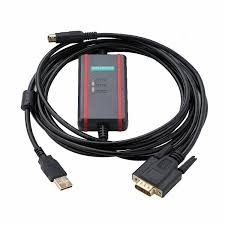
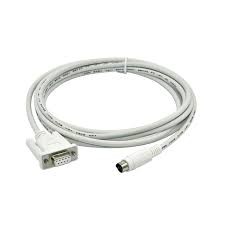
USB-LG-XGB PLC Programming Cable Suitable Korea LG LS K120S series
(0
reviews)
Sold by:
Inhouse product
Inhouse product

Price:
৳1.00
/Pcs
Share:
Top Selling Products


To connect and program a Korea LG LS K120S series PLC using the USB-LG-XGB programming cable, you’ll need to follow specific steps to ensure proper communication and programming.
Components Needed:
- USB-LG-XGB Programming Cable: This cable serves as the interface between your computer’s USB port and the PLC.
- Programming Software: You’ll need the appropriate programming software for the LG LS K120S PLC series.
Steps to Connect and Program:
- Install Programming Software:
- Download and install the programming software provided by LG for programming the K120S PLC series.
- Connect the Cable:
- Plug the USB end of the USB-LG-XGB cable into an available USB port on your computer.
- Connect the other end of the cable to the programming port on the LG LS K120S PLC.
- Configure Communication Settings:
- Launch the programming software (e.g., XG5000) on your computer.
- Go to the communication settings or port configuration within the software.
- Select the communication port associated with the USB-LG-XGB cable. This will typically appear as a virtual COM port on your computer.
- Set Up PLC Connection:
- In the programming software, create a new project or open an existing one.
- Configure the project settings to match the specifications of your LG LS K120S PLC (e.g., CPU type, communication settings).
- Ensure the software is set to communicate via the USB-LG-XGB cable.
- Program the PLC:
- Write your program logic within the programming software (XG5000 or similar).
- Use the software to establish a connection with the PLC through the USB-LG-XGB cable.
- Upload the compiled program to the PLC.
Summery:
By following these steps, you should be able to establish communication between your computer and the Korea LG LS K120S series PLC using the USB-LG-XGB programming cable and program the PLC accordingly. If you encounter any issues during setup or programming, consult the user manuals and technical documentation provided by LG for further assistance.
There have been no reviews for this product yet.
Related products



Signup For Newsletter
we'll never share your email address with a third-party
Be A Seller
Apply NowContact US
- Address: Elite House (6th floor),54, Motijheel C/A, Dhaka 1000.
- Phone: +8801737-042829
- Email: info@sellcobd.com


